How to Automate Office Work Without Creating More Busywork
Teams waste countless hours each day on repetitive tasks such as data entry, file organization, email sorting, and report generation. Learning how to automate office work transforms these time drains into streamlined processes, freeing up valuable hours for strategic thinking and creative problem-solving. Effective automation eliminates mundane activities without adding complexity to existing workflows. The key lies in choosing tools that work quietly in the background while maintaining the simplicity teams need to stay productive.
Smart automation learns workplace patterns and handles administrative workloads without replacing human judgment. Rather than creating additional layers of complexity, the right automation tools remove friction from daily operations and restore mental space for meaningful work. Teams can reclaim their most valuable resource by implementing solutions that streamline routine tasks. Bud's AI agent exemplifies this approach by quietly handling background processes while keeping workflows simple and effective.
Table of Contents
-
Why Office Work Still Feels Overwhelming Even After You Add More Tools
-
Why Most Office Automation Fails and Actually Adds More Work
-
How to Automate Office Work Using a Simple System That Actually Reduces Work
-
If Your Workflow Is Broken, Automation Won't Fix It—It Will Just Break Faster
Summary
-
Operating costs fall 10 to 50 percent after automating paper and Excel workflows, according to Technology Radius, but only when the underlying data is clean and structured. Automating a messy workflow doesn't clean it up. It scales the mess at machine speed, producing faster mistakes instead of better outcomes. Teams that skip process analysis before automation end up multiplying the chaos they were trying to eliminate.
-
More than half of workers lose productivity due to "gray work," the hidden effort of navigating disjointed tech systems, according to Quickbase's 2025 study. Each new tool creates coordination tasks between systems. You're not managing fewer tasks after adding software. You're managing the same tasks plus the work of keeping tools synchronized, copying data between platforms, and reconciling conflicting information.
-
70% of automation projects fail to deliver expected ROI within the first year, often because teams weren't prepared for how their daily work would shift (Tutor Intelligence Blog). The failure isn't the technology. It's the assumption that you can automate your way out of a problem you haven't defined clearly enough to solve manually. No change management means teams revert to email and build shadow processes because they don't trust the automated system.
-
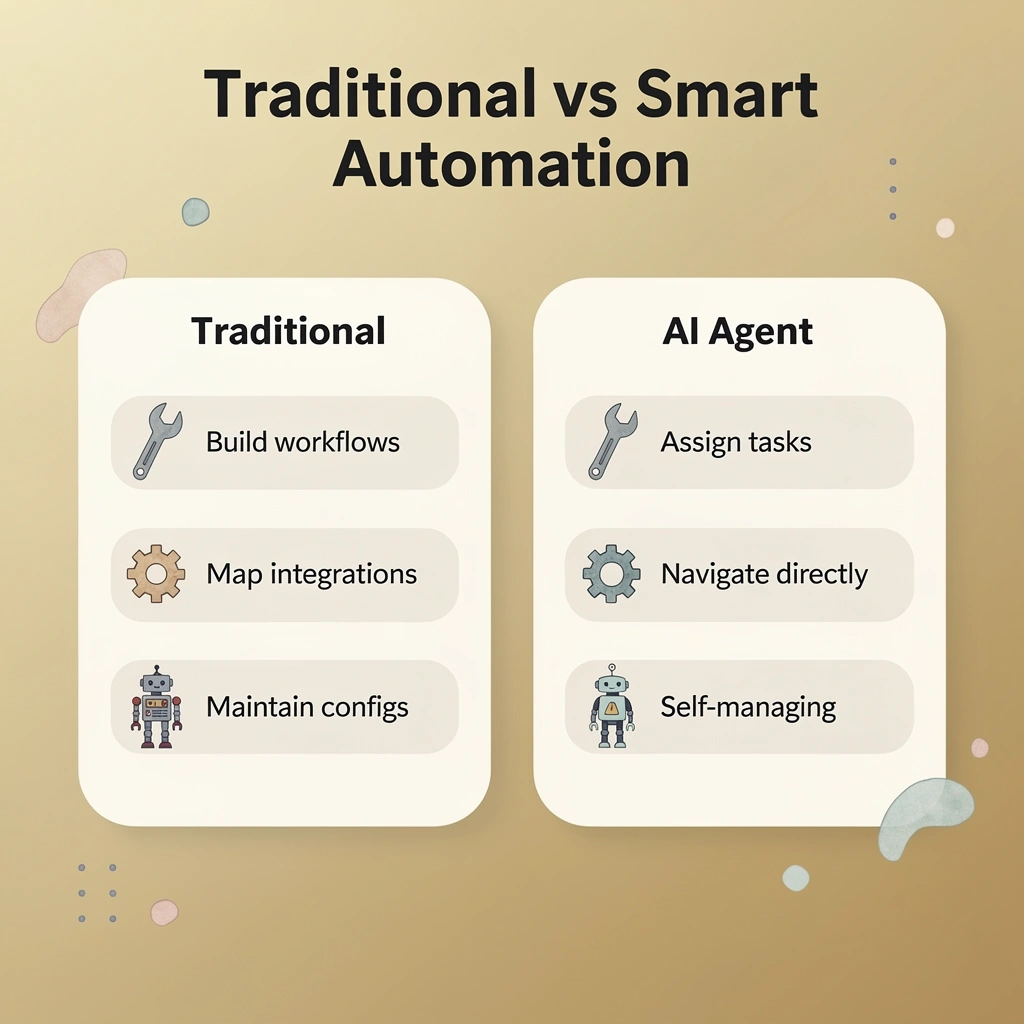
Traditional automation tools still require you to build workflows, map integrations, and maintain connections between systems. You're trading manual execution for manual configuration. The cognitive load shifts but doesn't disappear. When something breaks, you're back in the builder interface, troubleshooting why data isn't flowing correctly, which creates technical dependencies that slow expansion as you scale.
-
Process analysis, simulation, and mining form the foundation of successful automation. Analysis reveals where workflows actually break down, simulation tests whether proposed fixes will work before deployment, and mining verifies real-world performance against targets. Teams that skip straight to tool selection base decisions on vendor promises. Teams that start with analysis-based decisions on evidence of what actually breaks and proof that the fix works.
-
Bud's AI agent addresses this by handling end-to-end tasks instead of requiring you to configure workflows, operating through Telegram or text to navigate websites, fill out forms, and pull data across platforms without needing to build integrations.
Why Office Work Still Feels Overwhelming Even After You Add More Tools
You added project management software, a new CRM, and better communication platforms. The team received training, adoption progressed well, and leadership expected smoother operations. Instead, work feels busier than before. The tools are being used, but the workload hasn't decreased.
The problem isn't the tools themselves: each operates in isolation, creating new coordination tasks between systems. According to Quickbase's 2025 study, more than half of workers surveyed report losing productivity due to "gray work" caused by disjointed tech. You're managing the same tasks, plus keeping tools in sync.
Why do teams become bottlenecks between systems?
Your team updates the project tracker, then manually logs the same information in the CRM, and then sends a Slack message summarizing both. Someone must bridge these systems, copying data, chasing updates, and verifying consistency across tools. That person becomes the bottleneck, not from slowness, but because the infrastructure requires constant human translation.
What happens when clients need status updates?
When a client asks for a status update, you check three different platforms, reconcile conflicting information, and piece together a coherent answer. The exhaustion stems not from the work itself but from being the connective tissue holding disconnected systems together while everyone expects you to move faster.
Why does nobody own the complete workflow picture?
Each tool has an owner, but nobody is responsible for how they work together. Tasks fall through the gaps between platforms because accountability stops at each system's edge. A project advances in one tool while the corresponding client record grows stale in another, unnoticed until something breaks.
The mental load of tracking everything falls on whoever notices the gaps. You become the one sending reminders, checking whether updates occurred, and ensuring nothing critical is missed when things move between systems. Tools were supposed to distribute that burden, but instead they've multiplied the places where things can go wrong.
How can AI agents solve coordination problems?
That's where solutions like Bud's AI agent step in, not as another tool to manage, but as the thing that handles those handoffs independently. Instead of building integrations or training your team on new workflows, you delegate the coordination work to an AI that operates across systems the way a human assistant would.
But even when you know better tools exist, most automation efforts collapse under their own complexity.
Why Most Office Automation Fails and Actually Adds More Work
Most people expect automation to be simple: install software, set up workflows, and watch productivity soar. Instead, teams find themselves managing more work, not less.
Key Point: The problem isn't the technology—it's that automation gets added to a broken foundation. When processes are unclear, data is inconsistent, or success metrics are undefined, automation makes those problems bigger. What used to be a small inefficiency becomes a systematic bottleneck running at machine speed.

Warning: Without proper foundation work, your automation tools will amplify existing problems rather than solve them. Clear processes and consistent data are essential prerequisites for successful automation implementation.
Automating a broken process
If the underlying workflow is messy, automation makes it worse. Automating based on assumptions bakes in workarounds, redundant approvals, and unnecessary handoffs. Technology Radius reports that repetitive work can be cut by 60 to 95 percent when automation is applied correctly, but only when the process itself is sound. Automating chaos produces faster chaos.
The same issue appears in customer service queues and procurement requests. If routing logic mirrors a broken escalation path, the bot perpetuates the problem: requests get stuck, approvals take too long, and errors go unnoticed until someone complains.
No agreed definition of "done."
Automation depends on clarity. If different teams define completion differently, the workflow stalls at every handoff. Marketing might consider a lead qualified when it enters the CRM; sales might disagree unless the lead has been contacted twice. Without alignment, automation becomes a negotiation tool instead of a productivity gain.
This fragmentation appears in onboarding, contract approvals, and project handoffs. Each department builds its own version of the process, and automation inherits all of them, creating a patchwork system that requires constant manual intervention.
Weak data quality
Bots and workflows amplify incomplete or inconsistent data. If customer records lack phone numbers, automated outreach campaigns fail silently. If product SKUs differ across systems, inventory automation creates problems rather than solving them. Knowledge workers feel less strain once repetitive tasks are automated, but only when the data is reliable. Bad information in means bad information out, delivered faster.
Where do data quality problems originate?
The failure point is usually upstream: data entry is rushed, validation rules are skipped, and source systems go unaudited. By the time automation runs, the damage is done. Fixing it requires manual cleanup or additional automation to correct the first layer, adding complexity instead of reducing it.
Over-automating
Not everything should be automated. Building relationships, making tough judgment calls, and solving problems creatively don't work well in automated workflows. Automating these tasks removes the context that made the work effective. The process runs, but results suffer.
Customer complaints show this problem. Sending tickets to the right department can be automated, but solving the issue requires empathy, understanding, and flexibility. Automating the solution itself produces generic responses that miss customer needs, lowering satisfaction and forcing teams to spend more time fixing what the automation created.
No change management
Automation changes roles, ownership, and muscle memory. Skip the people side and adoption collapses. Employees who trusted a manual process must now trust a system they didn't design. When it behaves unexpectedly, they revert to old methods or create shadow processes. The automation runs, but no one uses it correctly, so the workload doubles.
Why does generic training fail in automation projects?
Training helps, but only if it's specific. Generic overviews don't prepare people for edge cases: what to do when the bot stops, data doesn't sync, or workflows loop indefinitely. Without that knowledge, one small error cascades, and no one knows how to intervene.
But the real reason this keeps happening runs deeper than most people realize.
How to Automate Office Work Using a Simple System That Actually Reduces Work
Start with three practices: process analysis to identify breakdowns, process simulation to test fixes, and process mining to confirm that the new process works in practice. This sequence grounds decisions on actual data rather than gut feeling. According to Alice App Blog, automation tools can multiply productivity by up to 10x, but only when applied to processes that have been properly analyzed and refined first.
Key Point: The three-step foundation of process analysis, simulation, and mining ensures your automation efforts target real bottlenecks rather than imaginary problems.
Warning: Automating a broken process simply creates faster failures. Analyze first, then automate.

What's the difference between back office and front office automation?
Back office processes (finance, IT, HR) involve structured data and predictable workflows, while front office processes (sales, marketing, customer support) involve unpredictable human interactions and require flexibility. The same automation approach fails when applied to both because the underlying patterns differ fundamentally.
Two types of office automation
Back office automation handles finance, IT, and HR processes that keep operations running behind the scenes. Front office automation addresses sales, marketing, customer support, and call center workflows that directly touch customers. Back office processes typically follow predictable patterns: payroll cycles, expense approvals, and system updates. Front office work responds to external triggers: customer inquiries, lead qualification, and support tickets. Teams that try to automate both with the same approach often succeed at neither, because the underlying rhythms and decision points operate differently.
What are the core components of office automation?
Office automation uses software to handle data storage, transfer, collaboration, and management tasks that once required manual coordination. Data storage moves to cloud systems where documents, spreadsheets, images, and videos are accessible to multiple users. Data transfer occurs through email, SMS, voicemail, and fax, enabling teams in different locations to exchange information instantly.
Real-time collaboration enables multiple users to update calendars, edit documents, and join video conferences simultaneously, which is critical when schedules change or projects need immediate input. Data management includes scheduling systems, reminders, and task tracking that monitor spending, inventory, and workforce allocation in real time.
How does automation replace manual coordination?
When a meeting time changes, one team member updates the shared calendar, and everyone sees the change immediately. When a deadline shifts, the task management system redistributes workload and sends automated notifications. The office automation system handles coordination work that once required phone calls, hallway conversations, and email chains.
Before you automate anything
Process analysis shows where workflows break down, not where you think they do. It means mapping each step, identifying handoffs, and spotting where work stalls, errors multiply, or information disappears.
How do you test fixes before implementation?
Process simulation tests whether your proposed fixes will work before you use resources, by modeling the improved workflow and verifying that changes deliver the expected outcomes. Process mining checks whether your new process performs as designed in real-world conditions, measuring actual cycle times, error rates, and resource usage against targets.
What separates successful automation from failure?
The difference between failed and successful automation comes down to this phase. Teams that skip picking tools make decisions based on vendor promises and tool features. Teams that start with analysis make decisions based on proof of what breaks and proof that the fix works.
What are the core activities that office automation handles?
Office automation handles four core activities: data storage saves information in multiple formats (texts, images, videos, audio) using tools like Word or spreadsheets; data transfer moves information electronically across distances through email, SMS, and voicemail; users access company servers from any device with an internet connection; real-time collaboration lets multiple people update data simultaneously during scheduling changes or document editing; and data management controls projects through scheduling systems, reminders, and task tracking for spending, inventory, and workforce allocation.
How do you validate automation before implementation?
Most teams choose automation technology without understanding what problem they're solving. Process analysis maps where workflows break down, identifying the exact points where work stalls, errors multiply, or handoffs fail.
Process simulation tests whether proposed improvements work before rolling out across the organization. Process mining verifies that the automated process delivers results in real-world conditions. This three-step validation prevents automating broken processes.
What are the main types of automation technology available?
Robotic process automation (RPA) uses software bots to automate repetitive tasks at the UI level, such as moving data from spreadsheets to application fields. Benefits remain limited because you're only accelerating an existing process, and scaling requires building and monitoring additional bots.
Business process management (BPM) tools automate workflows requiring human intervention, delivering greater benefits than RPA but missing tasks AI can now handle independently. Both create dependencies on specialists due to their technical complexity.
How do modern platforms address automation limitations?
An integration platform as a service (iPaaS) connects cloud applications and on-site systems through APIs, allowing data to flow reliably without being affected by user interface changes. However, most iPaaS solutions don't support end-to-end automations.
Enterprise automation platforms solve these problems through easy-to-use interfaces that enable business users to build automations without technical support. They include robust security and control features for large organizations and handle data integration, API management, app integration, and complete workflow automations in one place.
What if you want to delegate work entirely rather than build workflows?
For teams wanting to hand off work completely rather than build workflows, Bud's AI agent operates independently with its own systems. You assign tasks via simple text or Telegram messages, and the system executes them autonomously. This shifts the question from "how do I build this automation" to "what work can I delegate entirely."
What this means for your next step
Pick technology that fits your automation needs and your team's capabilities. RPA works well for simple, repetitive tasks when technical resources are available. BPM suits workflows requiring human involvement and dedicated specialists. iPaaS provides reliable connections and real-time data movement between systems. Enterprise platforms enable extensive automation without technical expertise. Selecting the wrong technology wastes money and creates problems that force teams to revert to manual processes.
But picking the right technology matters only if you're automating the right process.
If Your Workflow Is Broken, Automation Won't Fix It—It Will Just Break Faster
The problem isn't the tasks themselves: it's constant switching between systems, manually moving data, and multi-step processes not designed to run efficiently. Traditional automation tools still require you to build workflows, map integrations, and maintain connections between systems. You're trading manual execution for manual configuration. When something breaks, you're troubleshooting why data isn't flowing correctly between steps.
Warning: Traditional automation just shifts the manual work from execution to configuration—you're still stuck managing the process.
What changes the equation is delegating work to something that operates the way you do. An AI agent doesn't ask you to connect systems or build workflows. Our Bud agent lets you assign a task via Telegram or text, and it navigates websites, fills out forms, pulls data across platforms, and completes the process end-to-end. The problems you identified earlier—copying data, switching tabs, chasing updates—are removed at the execution level because you're handing off the work entirely rather than automating parts of it.
"You're trading manual execution for manual configuration—the work never actually goes away, it just moves to a different stage of the process."
Tip: You can try it in under five minutes. Launch Bud, assign your first repetitive workflow, and watch it complete the task end-to-end so you can step out of the loop instead of managing it.