13 Best Pinterest Automation Tools for Scheduling and Growth
Managing Pinterest growth requires consistent daily pinning, constant creative design, and manual keyword testing to hit algorithmic signals. Most creators struggle with inconsistent impressions, flat saves, and unpredictable traffic despite their efforts. Pinterest automation tools transform this exhausting cycle into a streamlined system, handling repetitive tasks while creators focus on content that converts.
Automation saves hours each week while boosting reach, traffic, and follower growth through strategic, consistent pinning. These tools act as intelligent partners, scheduling pins at optimal times and maintaining steady audience engagement. For comprehensive Pinterest management, Bud's AI agent learns brand voice and audience preferences to ensure every automated action aligns with growth goals.
Table of Contents
-
Why Pinterest Growth Now Depends on Consistent Content Scale
-
What Pinterest Automation Actually Means (And What It Doesn't)
-
13 Best Pinterest Automation Tools (And How to Use Them Without Losing Control)
-
Stop Managing Pins Manually at Scale. Go Beyond Pinterest Automation to Full Workflow Execution with Bud
Summary
-
Pinterest's algorithm now prioritizes consistent publishing velocity over viral moments, rewarding accounts that prove topical authority through sustained output. One creator published 20 pins daily for months, generating over 1 million clicks because the platform interpreted consistent volume as expertise. The challenge is brutal: manual workflows can't maintain the 15-20 pins per day that many successful accounts require without triggering burnout or spam filters.
-
Saves replaced vanity metrics as Pinterest's core engagement signal because saving indicates purchase or implementation intent. According to Digital Web Solutions, 85% of weekly Pinterest users have made purchases based on pins they saw from brands, making high save rates a direct predictor of conversion. Building this evergreen content library requires publishing volume that compounds over time, with year-one content resurfacing in search results twelve months later once algorithmic trust builds.
-
Modern automation handles four core functions that manual processes can't sustain: intelligent scheduling based on audience activity patterns, bulk content distribution across multiple boards with tailored descriptions, A/B testing frameworks for visual variations, and keyword optimization to surface under-saturated search terms. The platform now serves over 500 million monthly users according to BlogToPin, which means the window for manual trial and error has closed as the algorithm moves too fast for guesswork.
-
Pinterest enforces a 10-pin daily limit for new accounts, gradually increasing as trust builds, which means automation systems must navigate scaling constraints without triggering spam detection. Sophisticated tools create multiple pin formats from a single base image, test different headline formulas, rotate keyword combinations, and distribute them across boards while respecting platform limits. The execution happens in technical layers most users never see, handling velocity and variation testing while you own creative direction and strategy.
-
The substitution test reveals tool quality: if a platform disappeared tomorrow and you could replicate its core function in 30 minutes with basic scheduling software, you're paying for features you don't need. Genuine automation tools handle tasks requiring either custom development or hours of manual repetition, executing multi-step workflows across different systems rather than just firing off pins at preset times.
-
AI agents with full computer access handle the invisible labor between content creation and distribution that traditional automation leaves untouched. This is where Bud's AI agent fits in, executing complete workflows through conversation by navigating websites, extracting trending keywords, generating pin variations, scheduling across boards, and tracking performance without requiring code or manual system coordination.
Why Pinterest Growth Now Depends on Consistent Content Scale
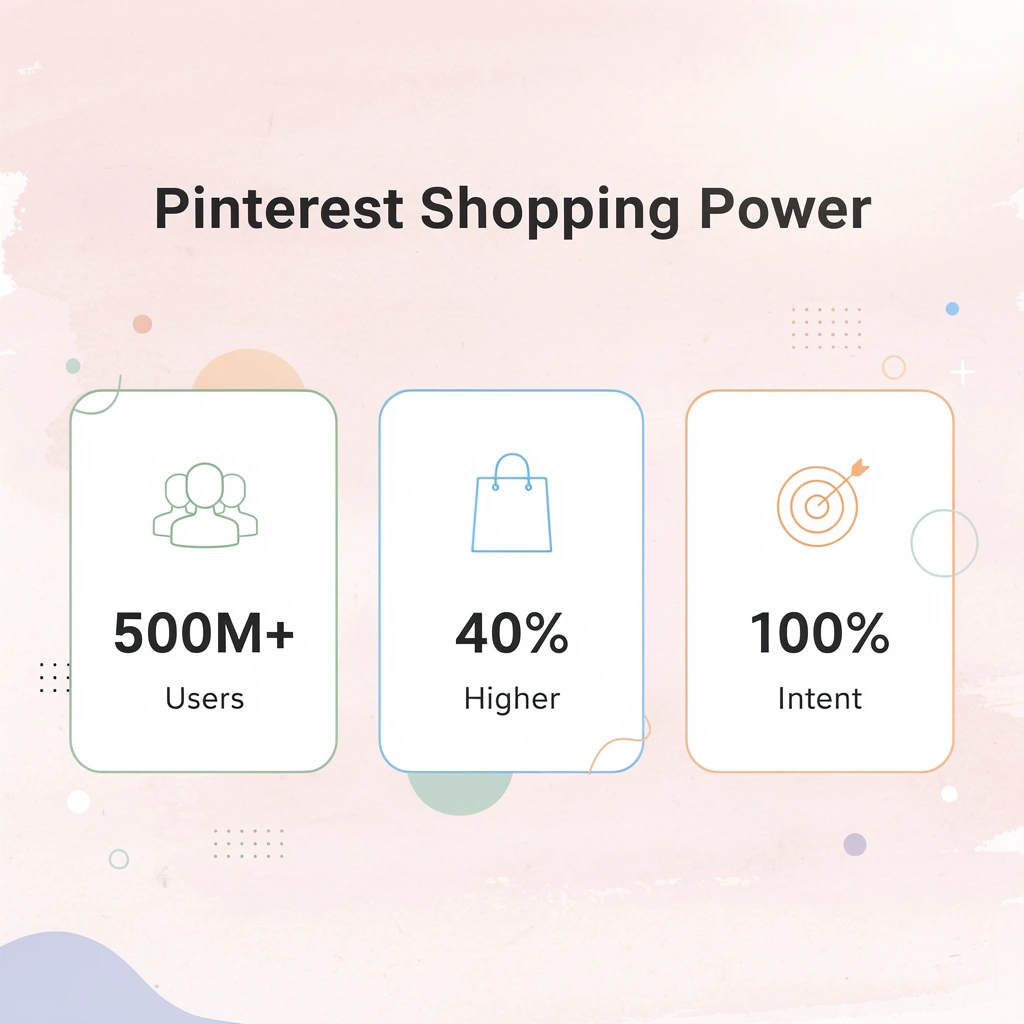
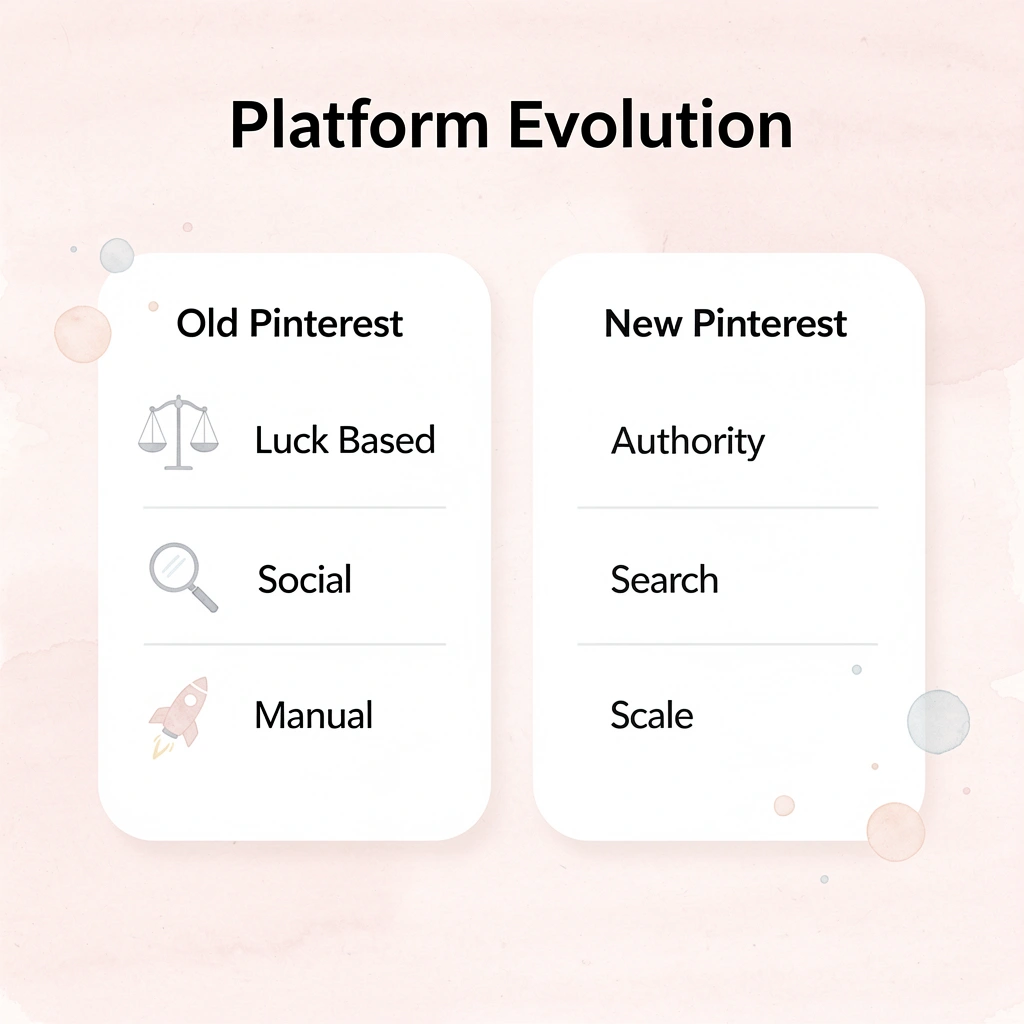
Pinterest stopped rewarding luck years ago. The platform's algorithm now functions as a search engine that demands proof of authority through sustained publishing velocity. With over 500M+ monthly users actively searching with purchase intent, it operates as a visual search engine rather than a feed-based platform.

According to Digital Web Solutions, Pinterest users are 40% more likely to say they love shopping compared to users on other platforms. Winning requires feeding the machine faster than manual workflows allow.
Key Takeaway: The shift from social platform to search engine means consistent content scale isn't just helpful—it's essential for Pinterest success.
Pro Tip: Think of Pinterest as Google for visual discovery—the more quality content you publish consistently, the higher your search authority becomes.
How did Pinterest's algorithm change content strategy
Pinterest stopped using the "repin everything" playbook when it prioritized original pin designs over recycled content. The platform's discovery engine now rewards accounts that publish new images with targeted keywords at scale, as each fresh pin creates another search pathway. One creator publishing 20 pins daily generated over 1 million clicks because the algorithm interpreted consistent output as topical expertise. Without execution speed, Pinterest's distribution remains locked.
Why do manual workflows fail at scale?
Manual workflows fall apart under this pressure. Creating new designs, exploring different keyword options, testing annotations, and keeping up with daily publishing schedules requires operational capacity most teams lack. The optimal posting rate is around 15–20 pins daily, but determining that number takes weeks of tracking impressions and saves while manually adjusting your posting frequency.
Post too fast and you trigger spam filters; post too slowly and your content never builds momentum with the algorithm. Consistency becomes the real challenge.
Why do saves indicate stronger user intent than viral metrics?
Pinterest prioritizes "saves" because saving a pin signals purchase or usage intent. Each save extends your content's lifespan, creating an evergreen library that continues driving traffic months after publication.
According to Digital Web Solutions, 85% of weekly Pinners have made a purchase based on Pins from brands, meaning high save rates correlate directly with conversion potential. Manual publishing processes cannot sustain the required volume without burnout.
How does the compounding effect build long-term visibility?
The compounding effect builds over time. Year one feels like constant seed-planting, but year two brings momentum as older pins appear in search results and recommendation feeds.
One blogger's content from their first year trended again twelve months later, proving that consistent content creation generates passive visibility. The challenge is persisting long enough to reach that turning point: manual workflows make consistency feel like punishment rather than progress.
When Automation Becomes the Execution Layer
Teams that grow Pinterest successfully in 2026 treat automation as their execution infrastructure, not a shortcut. Solutions like Bud demonstrate how AI agents with full computer access can handle complex, multi-step workflows that traditionally required extensive manual effort or custom development.
Rather than writing code to schedule pins, optimize keywords, and track performance across boards, you describe your needs through conversational interaction. Bud's AI agent independently executes the entire workflow, maintaining consistent publishing rhythm and variation testing that Pinterest's algorithm rewards, while you focus on content strategy and creative direction.
Automation only amplifies what already works.
What Pinterest Automation Actually Means (And What It Doesn't)
Modern Pinterest automation isn't a scheduler that pushes pins at set times—it's workflow amplification. It changes how content moves from creation to distribution, handling bulk uploads, keyword optimization, A/B testing of visual variations, and smart board placement based on engagement patterns. According to Pinterest, 97% of Pinterest users say they use the platform to plan purchases, which means every pin needs to match search intent when someone's ready to act. Automation tools make that precision possible at scale by analyzing when your audience browses, which keywords they search for, and which visual formats stop them from scrolling. Tip: True Pinterest automation goes beyond basic scheduling—it optimizes your entire content strategy based on real-time data and user behavior patterns.
Key Takeaway: Pinterest automation transforms reactive pinning into a proactive strategy, ensuring your content reaches the right audience at the optimal moment for maximum engagement.
How does Pinterest automation work across core functions?
The mechanism works across four core functions. Scheduling maps out weeks of content in a single session, eliminating daily publishing decisions. Content repurposing takes one blog post and generates dozens of unique pin variations with different headlines, images, and keyword combinations. A/B testing rotates visual formats automatically to surface which designs drive clicks. Keyword and board distribution pushes each pin to the right boards with search-optimized descriptions, ensuring Pinterest's algorithm surfaces your content when users search relevant queries.
Why does Pinterest require such a high publishing volume?
Top brands publish 15 to 30 optimized pins daily. That's infrastructure, not strategy. Maintaining this pace manually requires designing 450 pins monthly, writing descriptions, researching keywords, and tracking performance—unsustainable for most teams. Automation handles repetitive execution, freeing you to shift from reactive posting to strategic planning, analyzing what works, and building campaigns around winning themes.
How much does automation actually improve performance?
Pinterest CEO Bill Ready attributed the platform's first $1.15 billion in revenue quarter to AI-powered automation tools. The Performance+ suite halved the time spent on manual campaign setup while delivering nearly 80% better performance than traditional campaigns in controlled tests.
Wire saw a 98% ROAS increase with 52% lower cost per acquisition after switching to automated campaigns in 2025. Prada's 2024 campaign delivered 2.9x ROAS and 88% higher engagement. DORKO achieved 25x return on ad spend within five months. Automation fundamentally improves performance by operating at the speed and consistency humans cannot match.
What role should humans play when automation handles execution?
What automation can't replace is strategy. You decide what to say, which themes to pursue, and how to position your brand. You're offloading repetitive tasks that drain energy without adding value. Instead of uploading pins manually, you analyze performance data to spot patterns, build pillar content for variations, and engage authentically. The shift moves you from content factory worker to architect, focusing on decisions that compound while the system handles execution.
How does consistent posting build algorithmic trust?
Teams using Tailwind and SocialPilot publish 10 to 20+ pins daily without manual effort, maintaining the consistency that Pinterest's algorithm rewards. The platform favors accounts that consistently deliver fresh content, signaling they are valuable resources. Automation ensures your calendar never lapses, posting through weekends and holidays while you focus elsewhere. That steady presence builds algorithmic trust over time.
According to BlogToPin, over 500 million monthly users browse the platform, and consistent visibility keeps you in front of them when intent peaks.
What makes AI agents different from traditional automation tools?
Most automation tools work through limited API access, constrained by Pinterest's interface. Systems like Bud's AI agent operate differently. Instead of working within API limits, our agent executes full computer access, handling multi-step workflows the way a human would, but faster and without fatigue. It adapts based on real-time observations, testing variations, and iterating on what the platform shows it. This responsive execution transforms automation from a time-saver into a strategic advantage, handling complexity that traditional tools cannot.
The real question isn't whether automation works, but whether your current approach can execute what the algorithm now demands without it.
13 Best Pinterest Automation Tools (And How to Use Them Without Losing Control)
The right automation tool schedules pins, handles keyword optimization, visual testing, board distribution, and performance tracking, letting you focus on creative direction. The wrong tool adds complexity without results, forcing you to manage the automation instead of letting it manage your workflow. Key Point: The best Pinterest automation tools eliminate manual work while maintaining complete control over your content strategy and brand voice.
Warning: Over-automation can lead to generic content that fails to connect with your target audience and may violate Pinterest's community guidelines.
The Substitution Test That Reveals Tool Quality
Before committing to any platform, ask: Could you replicate its core function in 30 minutes with basic scheduling software? If yes, you're paying for unnecessary features. Real automation tools handle tasks requiring custom development or hours of manual repetition: executing multi-step workflows across different systems, not just firing off pins at preset times.
The best tools solve specific bottlenecks in your workflow. Some excel at content creation from existing assets, others at analytics and keyword research, and a few at cross-platform distribution. Match the tool to your actual constraint: design capacity, research depth, or publishing consistency, not marketing claims.
1. Bud: The AI Agent That Executes Full Workflows
Most automation platforms require complex manual setup of workflows, mapping every conditional step and connection point. Bud works differently: our AI agent has access to a full computer that can navigate websites, pull data, fill forms, and run multi-step processes across platforms through conversation. You describe what you need in plain language, and the agent handles the technical work independently.
How does Bud handle Pinterest automation specifically?
For Pinterest automation, explain your content strategy, keyword targets, and distribution preferences without writing code or navigating configuration menus. Our AI agent accesses content sources, generates pin variations, optimizes descriptions with trending keywords, schedules across boards, and tracks performance metrics. When Pinterest updates its algorithm, or you want to test new approaches, adjust through dialogue rather than rebuilding workflows.
2. Pin Generator: Automated Design at Scale
Pin Generator automatically turns any URL into multiple pin designs. Drop in a blog post link or product page, and the AI creates dozens of unique, on-brand variations in seconds. This solves a key creator challenge: Pinterest's algorithm rewards fresh visual content, but designing 15-20 pins daily depletes creative resources faster than most teams can sustain.
How does the platform optimize workflow efficiency?
The platform handles keyword optimization, smart scheduling based on audience activity patterns, and automated title rewriting to test engagement hooks. For bloggers and e-commerce businesses without dedicated design teams, this consolidates the entire creation process into a single system, eliminating the need for tab switching and manual coordination.
Why is consistent publishing velocity important for Pinterest success?
The auto-pins feature watches your content sources and creates new pins whenever you publish, maintaining a steady flow without manual effort. Pinterest interprets publishing frequency as a sign of expertise. Publishing gaps signal declining topic relevance to Pinterest's system, which reduces pin visibility even after you resume publishing.
3. Tailwind: Analytics-Driven Community Distribution
Tailwind built its reputation on detailed performance analytics and collaborative content sharing through Tailwind Communities. The analytics engine reveals which pin formats get saves, which boards attract your target audience, and when your followers engage most actively—transforming guesswork into testable hypotheses.
How do Tailwind Communities multiply your reach?
The Communities feature (formerly Tribes) creates distribution leverage by connecting you with creators in adjacent niches who share each other's content, multiplying reach beyond existing followers. Pinterest's algorithm values diverse sources sharing your pins, signaling broader relevance and triggering wider distribution in search results and recommendation feeds.
Why does Tailwind's reporting depth matter for marketing teams?
For marketing teams making data-driven decisions, Tailwind's reporting depth justifies the learning curve. You can track board health metrics, identify underperforming content before it damages account authority, and optimize posting schedules with precision that generic social media tools cannot match.
4. SocialPilot Multi-Platform Coordination
SocialPilot manages Pinterest alongside Instagram, Facebook, LinkedIn, and other platforms through a single interface. Centralizing control across multiple channels reduces context-switching friction and accelerates execution.
The platform's Pinterest features focus on scheduling and basic content curation rather than advanced automation or AI-powered creation. The interface prioritizes clarity over feature density, enabling faster onboarding but offering fewer specialized capabilities.
SocialPilot positions itself as a budget-friendly alternative to enterprise social media suites. For small businesses with limited resources across multiple channels, it delivers adequate Pinterest functionality without requiring a separate specialized tool, though you gain breadth at the expense of depth.
5. PinClicks: Research-Driven Strategy Development
PinClicks reveals data Pinterest keeps private: over 12 million keywords with search volume metrics, exact competitor pin performance, ranking tracking for target keywords, and Pinterest's hidden annotation tags that influence search placement. This transforms content strategy from educated guessing into data-backed targeting.
How does PinClicks help identify content gaps competitors missed?
Pinterest works as a visual search engine: users type in what they're looking for, and your pins either show up in the results or they don't. PinClicks reveals which keywords your competitors rank for, which search terms attract high volume with low competition, and which trending topics remain uncrowded. This helps you identify and target content gaps your competitors missed.
What are the limitations and investment requirements for PinClicks?
The platform focuses on research and analytics rather than content creation or scheduling, so you need separate tools to make and post content. Teams that build content calendars based on keyword opportunities find the $29 monthly investment worthwhile because they get more targeted, discoverable pins.
6. ContentGoblin Niche-Specific Content Generation
ContentGoblin targets food bloggers and lifestyle sites with AI-generated listicles and recipes optimized for Pinterest traffic. It creates complete articles with ingredient lists, instructions, subheadings, and Pinterest-optimized images for each section, posting drafts directly to WordPress.
What are the strengths and limitations of this specialized approach?
The specialization creates both strengths and limitations. For food or lifestyle creators, ContentGoblin's templates and AI training produce ready-to-use content. Outside those categories, the tool's value diminishes quickly. Pricing ranges from $39 to $109 monthly, depending on content volume.
How does bulk content creation support Pinterest's growth?
The bulk-creation capability matters for building the content library and for Pinterest's algorithmic rewards. You generate multiple articles quickly, then refine the AI output to match your voice. This approach works when volume matters more than perfection, particularly during initial growth phases when establishing topical authority.
7. PinInspector One-Time Research Investment
PinInspector offers desktop software for a one-time fee ($47–$67) instead of monthly subscriptions. It extracts 52+ data points from any pin, generates trending keyword lists, analyzes competitor pins, and reveals Pinterest's hidden annotation tags.
What technical requirements does PinInspector have?
The desktop-only interface requires more technical comfort than web-based alternatives, but it enables detailed competitor analysis and comprehensive data extraction. You can download pin images and videos to your computer, study successful board structures, and identify patterns across high-performing accounts in your niche.
Who should use PinInspector for content strategy?
The tool helps researchers and strategists build a content strategy by identifying keyword opportunities, understanding what works in your category, and then executing that strategy through creation and scheduling tools.
8. ContentGoblin: Niche-Specific Content Generation
Later built its interface around visual content calendars, making it intuitive for teams that think in images rather than spreadsheets. The mobile app enables on-the-go scheduling, which is important for creators capturing content in real-time. Pinterest support sits alongside Instagram and Facebook, providing multi-platform coordination without specialized depth.
What are Later's limitations for Pinterest growth?
The Pinterest features stay basic compared to tools made specifically for Pinterest. You can schedule pins and view simple analytics, but advanced automation, keyword optimization, and performance tracking require separate platforms. Later works best for users managing multiple visual platforms where Pinterest represents one channel among several, not the primary growth driver.
The beginner-friendly interface makes it easier to get started, but teams serious about Pinterest growth typically outgrow Later's feature set within months, moving to specialized tools once they understand what sophisticated automation enables.
9. Buffer Simplified Multi-Platform Management
Buffer prioritizes simplicity over feature bloat. The scheduling interface is intuitive, team collaboration tools handle basic approval workflows, and pricing starts at $5 per social channel per month. For small businesses managing multiple accounts without dedicated social media staff, Buffer eliminates the complexity that drives abandonment.
How does Buffer handle Pinterest integration?
The Pinterest integration lets you schedule posts and see basic analytics, but lacks advanced automation or special Pinterest features. You can maintain regular posting across platforms, though you'll need to conduct keyword research, test images, and optimize for the algorithm yourself or use additional tools.
When should businesses choose Buffer for Pinterest?
The low cost lets businesses test Pinterest for traffic before investing in dedicated tools. Set up a basic system that works consistently, then move to automation once you've confirmed Pinterest delivers results for your business.
10. Hootsuite Enterprise-Level Coordination
Hootsuite serves medium- to large-sized businesses with dedicated social media teams that manage multiple accounts across multiple platforms. The dashboard integrates scheduling, analytics, and team collaboration with enterprise-grade security and detailed reporting. Pricing starts at $99 monthly, reflecting its professional infrastructure rather than creator tooling.
How does Pinterest integration work within broader workflows?
Pinterest works well with other social media tools, though it lacks depth. You can manage multiple platforms consistently and coordinate with your team, but optimizing Pinterest requires extra work or additional tools. Hootsuite suits organizations managing social media across platforms, not those focused on maximizing a single platform.
What should teams expect from the learning curve?
Learning to use Hootsuite takes time due to its extensive features. Teams often find it confusing initially, but the complexity enables collaboration that simpler tools cannot match. The investment pays off when managing multiple brands, different geographic markets, or complicated approval processes.
11. Canva Design-First Pinterest Publishing
Canva built its reputation on making design tools easy to use, then added Pinterest scheduling as a helpful feature. The platform offers thousands of Pinterest-optimized templates, drag-and-drop editing, stock photos, and direct publishing to Pinterest.
What are Canva's scheduling limitations?
Scheduling capabilities remain basic compared to dedicated automation platforms. Advanced features such as keyword optimization, performance tracking, and automated variation testing require separate tools. Canva excels at creation, not distribution strategy or algorithmic optimization.
How should you use Canva effectively?
The free plan suits casual Canva users. Canva Pro costs $15 per month and provides access to premium templates and brand kit features. You can create visuals in Canva, then share them through specialized automation tools that handle the execution layer Canva doesn't address.
12. Sprout Social Official Partnership Analytics
Sprout Social holds official Pinterest Marketing Partner status, granting access to superior analytics APIs and platform support. This enables teams to gain deeper insights into content performance than standard social media tools, making it valuable for those who leverage Pinterest as a primary traffic driver. Pricing starts at $249 per month.
What insights does the enhanced analytics provide?
The analytics show which content types get saved, how pins perform based on board organization, and which keywords drive qualified traffic. For businesses where Pinterest generates significant revenue, these insights prove the investment's worth by improving a channel that delivers real returns.
How does it compare to generic alternatives?
While the platform handles social media management across multiple platforms, its specialized analytics and official partnership status distinguish it from generic alternatives. Teams treating Pinterest as a core growth channel find that its feature depth aligns with their strategic commitment.
13. BlogToPin: True End-to-End Automation
BlogToPin automates Pinterest content management from start to finish. With Pinterest serving over 500 million monthly users, automation is essential for maintaining a consistent presence. The platform automatically syncs sitemaps to find new blog posts, creates AI-optimized pins with smart titles and descriptions, schedules them at optimal times, and removes underperforming content.
What makes BlogToPin's AI testing approach effective?
After you set up the platform, you need to spend about 30 minutes each month managing it. The AI creates different pin versions that test various visual styles and keyword combinations. This testing matters because Pinterest's algorithm rewards accounts that consistently test and refine content.
How does BlogToPin compare to other solutions?
WordPress integration makes it easy for bloggers to set up, while detailed analytics show which content drives traffic and conversions. At $19 monthly, BlogToPin costs significantly less than hiring a virtual assistant while delivering more consistent results. Its focus on Pinterest enables better optimization than multi-platform tools.
Why does manual control become a bottleneck?
The fear of losing control stops many teams from using automation, but manual processes create a different control problem: you become the bottleneck. Every pin requires your attention, every scheduling decision demands your time, and every performance check pulls you away from strategy.
How does automation change the control dynamic?
Good automation flips this around. You control the big-picture strategy, creative direction, and improvement priorities. The system controls execution speed, version testing, and performance monitoring. This split lets you focus on decisions requiring human thinking while systems handle repetitive, large-scale tasks.
What makes automation partnerships successful?
The teams that grow Pinterest successfully treat automation as their execution infrastructure. They define success, establish quality standards, and monitor performance trends. Automation handles high-volume, low-judgment tasks that consume time without requiring creativity. This partnership between human strategy and automated execution creates leverage that is impossible with either approach alone.
The real challenge isn't choosing tools—it's building workflows that execute your strategy without constant supervision.
Stop Managing Pins Manually at Scale. Go Beyond Pinterest Automation to Full Workflow Execution with Bud
Pinterest's growth fails at execution scale, not strategy. The fastest way to test whether AI-driven automation can remove that bottleneck is to automate a single real task end-to-end.
Start a session with Bud and type: "Set up a Pinterest automation workflow for my niche."
In under 5 minutes, you can:
-
Describe your Pinterest workflow: what you currently pin, how often, and your niche.
-
Have the AI generate a structured pin workflow: content, keywords, and scheduling logic.
-
Let AI generate and schedule your first automated pin sequence.
-
See a working execution flow that handles keyword research, pin variation, and scheduling without manual coordination.
You don't need setup guides, integrations, or technical configuration. Bud runs through the conversation, so your only input is what you already do manually today.
If it works, you'll see your first automated content flow running the same day. If it doesn't fit your process, you've spent 5 minutes validating that without changing your stack.